
Windows 11 Debuts Powerful New AI Features Such as Copilot Vision Screen-Scanning
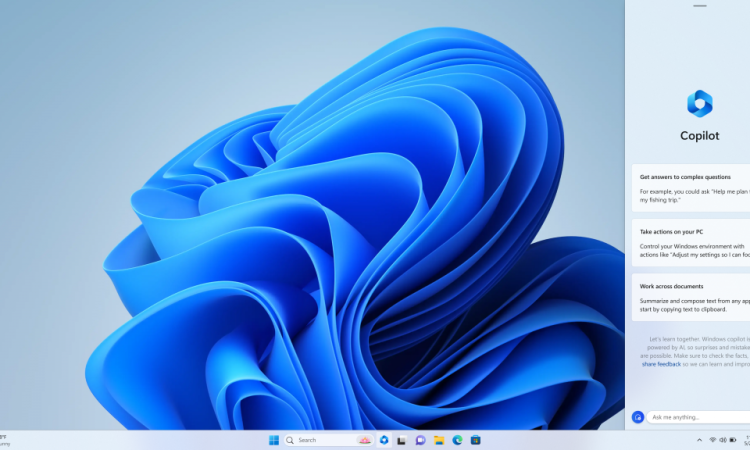
Microsoft is taking a bold step forward in personal computing with a new Windows 11 update packed with AI-driven capabilities. Among the most exciting is Copilot Vision, an intelligent assistant designed to help users interact with their PCs more effectively.
Copilot Vision: A Smarter Assistant Paying Closer Attention
The standout addition is Copilot Vision, an AI-powered assistant capable of analyzing everything displayed on your screen. Unlike traditional digital assistants that respond only to user prompts, Copilot Vision is context-aware — it “sees” what you see, allowing it to provide real-time suggestions, help, and automation across tasks.
Real-World Applications of Copilot Vision
- Document Assistance: If you’re referencing a chart in a document, Copilot Vision can understand both and help summarize the chart data or assist in writing content around it.
- Cross-App Intelligence: It can recognize actions across apps — such as suggesting calendar entries from emails or prompting intelligent form completion.
Key Impact: This dramatically improves workflow efficiency, reducing the need for constant app-switching and enabling a more seamless productivity experience for students, professionals, and creatives alike.
Now Available Beyond Copilot Plus PCs
Originally launched with Copilot Plus PCs, Copilot Vision is now rolling out to all Windows 11 devices. However, performance may vary based on hardware capabilities such as neural processing units (NPUs) or high-end CPUs.
While the experience on lower-spec devices may be limited in responsiveness, Microsoft promises meaningful functionality regardless of system tier.
More AI-Powered Enhancements in Windows 11
Alongside Copilot Vision, the update brings several other innovative AI tools aimed at enhancing usability and productivity:
1. AI-Powered Snap Suggestions
- Expands on Snap Layouts by using AI to recommend optimal app arrangements based on user behavior and current engagement.
- Can group windows or suggest which ones to minimize or close.
2. Real-Time Summarization and Content Extraction
- Enables on-the-fly summarization of long documents, PDFs, email threads, and more.
- Helps users identify key insights without combing through pages of content.
3. Smart Recall for Copilot Plus PCs
- Exclusive to Copilot Plus devices, this feature allows natural language search across previous activity:
- Example: Typing “show me that budget spreadsheet from last week” surfaces the relevant file without needing its exact name.
4. Photos App with AI Image Editing
- Brings AI-assisted creativity to the Photos app, finally modernizing image editing on Windows with generative AI features for design and visual enhancements.
Privacy First: On-Device AI Models
To address privacy concerns, Microsoft has ensured that many new AI features are designed to work locally on-device. This:
- Reduces reliance on cloud computing
- Limits data transmission
- Ensures greater user control and confidentiality
Users can interact with AI that learns from on-device activity, like open documents or apps, without uploading data to external servers.
Microsoft’s AI Vision: Deep OS Integration
Unlike competitors who add AI to specific apps, Microsoft’s approach is to deeply embed AI within the operating system. This means:
- Seamless assistance across the entire Windows experience
- AI becomes “ambient” — always present and available
- Reflects CEO Satya Nadella’s vision of Windows evolving from a “static platform” into a “dynamic co-pilot”
AI Race and Competitive Landscape
Microsoft’s innovation comes amid intense AI competition:
- Apple is launching on-device generative AI for iOS and macOS.
- Google continues expanding its Gemini AI across Android and Chrome.
But Microsoft’s strategy of AI-infused OS-level integration gives it a clear edge, aiming for ubiquity and utility over novelty.
User Concerns: Privacy and Transparency
Not everyone is immediately on board with screen-scanning AI assistants. Microsoft acknowledges these concerns and offers:
- Clear privacy controls
- User-enabled permissions for what Copilot Vision can access
- Visual indicators when AI is active
- Commitment to processing data locally first, where possible
Transparency is a top priority as Microsoft aims to earn trust in its AI-driven future.
Rollout Timeline
The features are being rolled out in phases:
- General availability by end of August 2025
- Features like Smart Recall and advanced Photo Editing will reach Copilot Plus PCs first
- Users are advised to enable Windows Update and check regularly to receive features as soon as they’re available
Final Thoughts: A New Era of Intelligent Computing
This update reflects Microsoft’s bold vision of the future — a world where your PC is more than just a tool, but an intelligent partner in your work.
With Copilot Vision and a suite of AI tools, Windows 11 is becoming an ambient, assistive OS, making computing faster, smarter, and more human-centric.
Whether it’s writing documents, organizing tasks, editing images, or finding files, users will now collaborate with their computers in ways never before possible.
Windows 11’s AI evolution is more than a software update — it’s a glimpse into the next generation of productivity and interaction.








