
Zoom Jumps Into the Metaverse: New Meta Quest App Brings Video Calls to Virtual Reality
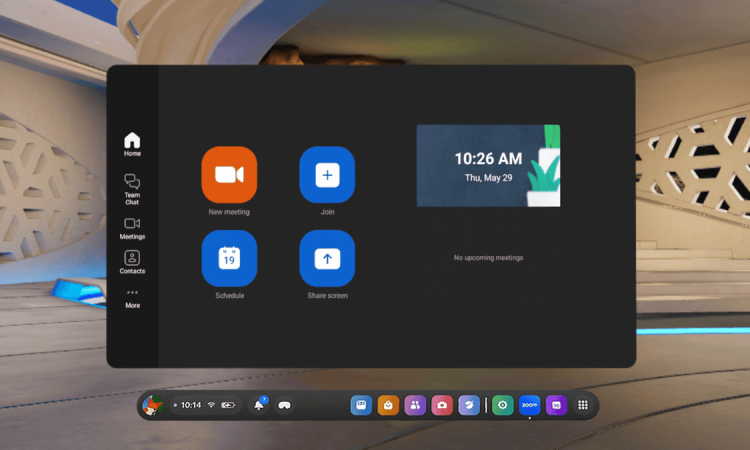
July 11, 2025 — In a giant leap for the future of communication, Zoom has announced the release of its much-anticipated Meta Quest app, which brings video calling to your VR headset!
This new step isn’t just a technical advancement — it’s a major move toward incorporating mixed reality with everyday communication. At the heart of this transformation, and with Meta’s Quest headsets leading the movement, Zoom’s new product feature strives to bridge the gap between in-room and online presence.
Zoom’s New Virtual Reality Feature: A Glimpse Into the Future of Work
The new Zoom app for Meta Quest enables people to:
- Join meetings
- Make video calls
- Collaborate virtually
…all in a 3D-composited space using either avatars or live webcam feeds embedded within virtual screens.
While VR meetings have existed before, Zoom’s integration with Meta Quest is among the most high-profile applications of the technology to date.
Designed to simulate in-person meetings, the VR version of Zoom allows you to:
- Look around the virtual room
- Make hand gestures
- Move within the space
Participants can appear as avatars or stream their real-world camera feeds into the VR space, blending realism with immersion. The result is a more engaging and dynamic experience than traditional video conferencing.
Essential Elements of the Zoom Meta Quest App
Zoom’s VR app is packed with features that enhance productivity and collaboration in the metaverse:
1. Virtual Meeting Rooms
Join or host Zoom meetings in a variety of virtual environments, such as:
- Offices
- Boardrooms
- Creative spaces
- Home settings
2. 3D Avatars
Create personalized avatars that simulate facial expressions and body movements, thanks to Meta Quest’s sensors and hand-tracking technology.
3. VR Screen Sharing
Share presentations, screens, or videos on virtual whiteboards, enabling easy and interactive content viewing.
4. Hybrid Video Integration
Non-VR users can join meetings in the usual way, appearing as floating video feeds in the virtual space.
5. Spatial Audio
Sound direction matches the avatar’s location, making conversations more immersive and easier to follow.
The Partnership with Meta
The collaboration leverages the hardware and software strengths of Meta’s Quest 3 and Quest Pro headsets. Meta, an advocate for the metaverse and digital shared spaces, is counting on business adoption to help expand virtual reality beyond entertainment.
“Now, more than ever, we rely on connections with other people to collaborate, meet, and share ideas to drive meaningful activities in our lives,” said Zoom’s product team.
A spokesperson added:
“We want to build a communications experience that feels less like stuffy business meetings and more like you’re hanging out in the same room — even when you’re miles apart. VR is no longer just a novelty — it’s becoming an essential tool.”
A Response to the Evolution of Remote Work
With remote and hybrid work now a staple across industries, businesses are exploring ways to boost engagement and maintain strong collaboration among distributed teams.
While video calls have proven effective, they often lack the spontaneity and human nuance of in-person conversations.
Zoom’s VR features help solve this by offering:
- Virtual brainstorming rooms
- Stand-up meetings as avatars
- Digital replicas of office spaces for team-building
This is particularly beneficial in fields like:
- Design
- Architecture
- Technology
- Education
…where spatial awareness and interactivity are essential.
Accessibility and Adoption
A key concern around the new release is accessibility:
- While Meta’s Quest headsets are more affordable than other high-end VR gear, they may still be out of reach for individual users or smaller teams.
- Comfort is also a factor — wearing a headset for long periods may not suit everyone.
However, Zoom emphasizes that VR is optional, not a replacement:
- Users can decide when and how to use VR.
- The app is fully compatible with Zoom’s desktop and mobile interfaces.
- Teams can transition gradually without disrupting existing workflows.
Meta also hinted at wider hardware support in the future, suggesting that VR video calls could expand across platforms as the technology matures and becomes more affordable.
Privacy and Security
Zoom is placing strong emphasis on privacy and security, especially given past scrutiny during the pandemic.
- All VR communications are encrypted
- Users have full control over:
- How they appear
- Who can interact with them
- What information is shared
Zoom’s VR meetings comply with:
- Enterprise-grade authentication
- Administrative controls
- Data governance policies
Industry Reaction and Future Outlook
Early feedback has been largely positive, especially among:
- Tech-forward companies
- Early adopters of VR
Some users report that the sense of presence in VR:
- Reduces meeting fatigue
- Makes collaborative work feel more natural
However, experts caution:
- Widespread adoption will require cultural shifts in addition to technological improvements.
- Not everyone is ready to wear a headset for a video call.
- Businesses must weigh costs vs. benefits of shifting to immersive tools.
Still, Zoom’s move signals a turning point in workplace communication technology. With VR headsets becoming lighter, cheaper, and more powerful, daily integration of such tools is increasingly likely.
What’s Next for Zoom and VR?
Zoom’s plans extend far beyond just meetings. The company is exploring VR solutions for:
- Webinars
- Virtual classrooms
- Large-scale conferences
Future updates may include:
- AI-powered real-time language translation
- Emotion detection in VR
- Productivity tools built into virtual desktops
For Meta, this strengthens its case that the metaverse can be a functional, working space — not just for games and socializing, but also for productivity.
Conclusion
Zoom’s new Meta Quest app is not just a tech novelty — it’s a strategic leap into the future of communication.
By combining Zoom’s trusted video call platform with the immersive power of Meta’s VR hardware, this app introduces a compelling new way to meet, collaborate, and connect.
As the digital world evolves, innovations like this may become the new normal. For remote workers, educators, creatives, and businesses alike, “joining a Zoom call” could soon mean stepping into a fully immersive virtual world.








